

Call us: +86-137-2353-4866


Adding application sensors to your industrial workflow helps a lot. You can make things more automatic, safe, and efficient with sensors like SOUSHINE’s force sensing resistor. These sensors are used in many different ways. You get better monitoring in car seats to check if someone is sitting. Robots can feel touch better. Medical devices keep patients safer. Application sensor technology changes to fit what you need. It works well in many industrial places. You get good data and strong performance if you plan for setup and care.
- Sensors help you:
- Make manufacturing more accurate
- Make healthcare safer
- Help robots work better
- Make car systems stronger
Table of Contents
Key Takeaways
Application sensors help make work faster and safer. They also help things run better in factories. Pick sensors that work well in your space. This helps you get good and true data. Try out sensors first with a small test. This helps you find problems before using them everywhere. Teach workers often so they know how to use and care for sensors. Think about things like dust and water. These can hurt how sensors work. Use good ways to keep sensor data safe. Check and fix sensors often. This helps them work right and last longer. Pick brands you trust, like SOUSHINE. They make strong and good sensors.
Quick Guide to Application Sensor Integration
Main Steps Overview
You can use easy steps to add sensors to your workflow. These steps help you build a strong monitoring system and keep things working well:
- Standardization and Interoperability: Pick communication protocols that match your systems. This helps your sensor send data without trouble.
- Robust Sensor Selection: Choose sensors that work in your environment. Make sure they are tough and accurate for industrial jobs.
- Scalable Data Management Systems: Set up systems that can handle lots of sensor data. This lets you watch and study information for better monitoring.
- Pilot Testing & Phased Integration: Begin with a small test first. Fix problems before adding more sensors. This saves time and money.
- Training and Iterative Improvements: Teach your team how to use and care for sensors. Keep making your process better as you learn.
Tip: Always plan before you start. Know what you want to measure and how sensors will help your workflow.
Key Considerations for Success
Think about some important things to make your sensor setup work well. These ideas help you avoid trouble and get the best results:
- Dust can block sensor readings. Use sensors with high IP ratings and covers.
- Moisture can hurt sensors. Pick sealed housings for wet places.
- Vibration can mess up calibration. Use sensors made to resist vibration.
- Secure data transmission keeps your data safe. Use encrypted protocols.
- Risk assessment helps you find problems with storing and managing data.
- Edge computing lets you process data near the sensor. This cuts delays and helps with real-time monitoring in industrial jobs.
- Learn about your current systems. This helps you match new sensors to your workflow.
- Train your staff. They need to know how to use and care for sensors.
- Solve technical problems early. This lowers risks and keeps your monitoring system smooth.
Common Pitfalls to Avoid
Many companies make mistakes when they add sensors to their workflow. You can skip these problems by learning from others. Here is a table with common mistakes and what they mean:
| Mistake/Pitfall | Description |
|---|---|
| Overestimating ease of integration | You might think adding sensors is fast, but it needs careful planning and data checks. |
| Insufficient error handling | If you ignore errors, you can lose data or get wrong readings. |
| Ambitious integration scope | Trying to add too many sensors at once can overload your team and system. |
| Poor architectural decisions | Quick fixes can cause big problems later as your needs change. |
Note: Start small and build up. Always check your system and data before you add more sensors.
Understanding Application Sensors and Pressure Sensing
What Are Application Sensors?
Application sensors help you measure and control many things. You use them in factories, hospitals, and robots. These devices track movement, pressure, flow, temperature, and force. They give you real-time data. This helps you make fast choices and keep machines working well.
- Sensors help you watch your machines all the time. This makes your work faster and easier.
- They let you automate jobs. This means machines can do tasks by themselves. It helps your production line run better and stops long breaks.
- Sensors keep things safe and check for quality.
- There are different sensors for different jobs:
- Position sensors check where things move or are placed.
- Pressure sensors watch changes in liquids or gases.
- Flow sensors tell you how fast liquids or gases move.
- Temperature sensors show if things get hotter or colder.
- Force sensors find out how much something pulls or pushes.
Smart factories use sensors to check how much they make. This helps them spend less on fixing machines. You see sensors in many places in modern industry.
How Pressure Sensors Work
Pressure sensors are important in many factory jobs. They measure how much force a liquid or gas puts on something. When the pressure changes, the sensor’s electrical signal changes too. There are different kinds of pressure sensors. Each one works in its own way.
Here is a table that shows how each type of pressure sensor works:
| Technology Type | Principle of Operation |
|---|---|
| Strain Gauge | Measures resistance changes when pressure bends it. |
| Capacitive | Finds changes in capacitance when a part bends from pressure. |
| Piezoelectric | Makes an electric charge when pressure is added. |
| Inductive | Measures how a part moves and changes a magnetic field, turning it into a signal. |
| Optical | Uses blocked light to make a signal when pressure changes. |
You pick the right pressure sensor for your job. These sensors help you watch and control your machines better.
Role of Sensors in Industrial Automation
Sensors are very important for making factories automatic. They help you watch things like temperature and pressure. You get feedback fast, so you can fix problems quickly. Pressure sensors help machines work their best.
- You make machines work better by checking speed, heat, and pressure.
- Sensors help you waste less and stop machines from breaking down.
- They keep people safe by finding dangers and setting off alarms.
- Sensors help you check if products are made right and find mistakes.
Pressure sensors let you automate jobs and keep your work safe and smooth. You need sensors to make smart factories and reach today’s production goals.
Types of Industrial Pressure Sensors
There are many kinds of pressure sensors in factories. Each one is best for certain jobs. You should know how they are different before you pick one. Pressure sensors help you check and control pressure in machines, pipes, and tanks. You use them to watch systems, keep things safe, and make work automatic.
Pressure sensors come in many shapes and materials. Some are made with silicon. Others use ceramic or metal. Each kind has good and bad points. The table below shows the main types of industrial pressure sensors. It tells you how each works, where you use it, and what to be careful about.
| Type of Sensor | Key Advantages | Key Limitations | Ideal Applications |
|---|---|---|---|
| Silicon | High accuracy, fast response time, excellent stability, wide temperature range | Susceptible to shock pressures, high vacuum limitations | Industrial automation, medical devices, automotive, aerospace |
| Ceramic Diaphragm Thick Film Strain Gauge | Cost-effective, chemical resistance, compact & hygienic | Lower accuracy, limited pressure ranges, vulnerability to surface damage | Chemical processing, OEM design, industrial printers, water & wastewater treatment |
| Ceramic Diaphragm Variable Capacitance | High precision, excellent long-term stability, corrosion resistance | Higher cost, fragility, limited pressure range | Chemical process monitoring, environmental monitoring, research & development |
| Thin Film Strain Gauge | Miniaturization, high sensitivity, excellent durability | Lower output sensitivity, limited absolute pressure ranges | Motorsport, hydraulics, research & development, aerospace, industrial applications |
| Bonded Foil Strain Gauge | Robustness, cost-effectiveness, high shock & vibration tolerance | Lower accuracy, longer manufacturing time, calibration drift | Hydraulics & pneumatics, industrial applications, high-pressure environments |
Silicon sensors are common in factory automation. They give quick and correct pressure readings. You also see them in medical tools and cars. Ceramic diaphragm sensors are good for chemical jobs. They do not get damaged by chemicals and are easy to keep clean. Thin film strain gauge sensors are small and fit in tight spaces. You use them in motorsports and planes. Bonded foil strain gauge sensors can take a lot of shaking and hits. You find them in hydraulics and other hard jobs.
Pressure transducers and pressure transmitters are important too. Pressure transducers turn pressure into an electric signal. You use them when you need exact readings. Pressure transmitters send this signal to your control system. You need transmitters when you want to check pressure from far away or in hard places.
Pick the sensor that matches your job. Think about the pressure range, where you will use it, and how often you need to check pressure. Some sensors are better for wet spots. Others work well with heat or strong chemicals. You can make your monitoring better by choosing the right sensor.
Tip: Always look at the sensor’s features before you buy. Make sure it fits your pressure range and works with your system.
Pressure sensors, pressure transducers, and pressure transmitters help keep your machines safe and working well. You can trust these sensors to give you the data you need to make smart choices in factories.
Define Workflow and Pressure Sensor Requirements
Identify Measurement Needs
First, you need to know what you want to measure. Every job needs different pressure sensors. You should think about a few things before picking a sensor. The table below shows what you need to check when planning for pressure measurement:
| Factor | Description |
|---|---|
| Application Requirements | Think about what you are measuring, like liquids or gases. Check the pressure range, accuracy, and type of measurement. |
| Environmental Factors | Look at temperature, vibration, EMI, and if the area is dangerous. |
| Sensor Design and Features | Check the sensor technology, output signal, what it is made of, and how it connects. |
| Cost and Maintenance | Compare the first cost and long-term costs. Think about calibration and if you can get help. |
Check if your sensor will be in hot or cold places. See if there will be strong shaking or electromagnetic interference. You also need to know if you will measure liquids or gases. These details help you pick the right sensor for your job. Good planning helps your sensors give you good data and correct monitoring.
Set Performance and Accuracy Goals
You need to set clear goals for your sensor’s performance. In factories, accuracy is very important. You want your pressure sensors to give the right numbers every time. Here are some things to check when you set accuracy goals:
- Nonlinearity error: How much the output line is off.
- Hysteresis error: How much the output changes when pressure goes up or down.
- Non-repeatability error: The biggest difference over the set range.
- Zero offset error: The difference at zero pressure.
- Span setting error: The difference for span pressure.
- Zero and span temperature coefficient error: The difference when temperature changes.
You should also look at other important features for your sensor:
- Temperature Range: How well it works in different temperatures.
- Stability: If it works the same for a long time.
- Response Time: How fast it gives feedback.
- Environmental Considerations: How moisture, shaking, and pressure cycles affect it.
You can use the table below to compare how accurate pressure sensors are:
| Accuracy Grade | Error Range |
|---|---|
| C3 | ±0.020% (1 in 5000) |
| C2 | ±0.030% |
| C1 | ±0.050% |
| G1 | ±0.1% (1 in 1000) |
| G2 | ±0.2% |
| G3 | ±0.3% |
| G5 | ±0.5% |
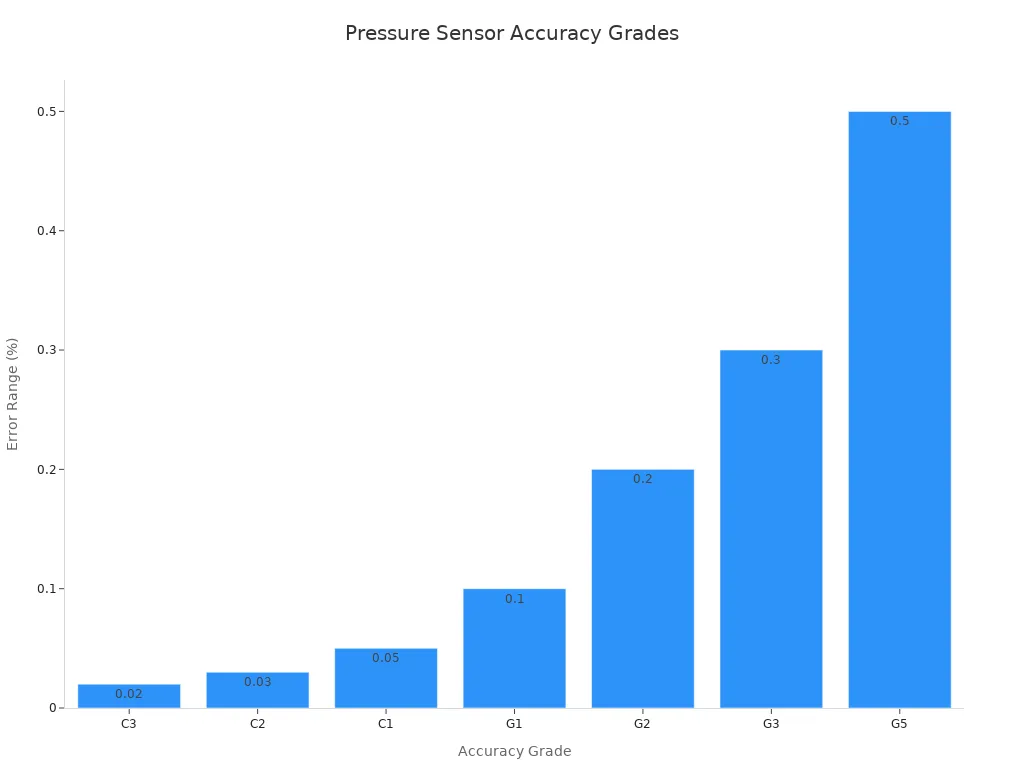
When you set your goals, think about how much error is okay. Better accuracy means better monitoring and safer work.
Gather Input from Stakeholders
You should ask everyone who will use or take care of the sensor. Different people may want different things for pressure, accuracy, and data. Use different ways to get their ideas and make sure your sensor fits the job. The table below lists good ways to get feedback:
| Technique | Description |
|---|---|
| Interviews | Ask open questions to learn about business needs and user problems. |
| Questionnaires | Get answers from many people at once with good questions. |
| User Observation | Watch people work to see what they need and where they have trouble. |
| Document Analysis | Read old papers to find out what is missing or needed. |
| Workshops | Talk in groups to fix problems and check what everyone wants. |
| Brainstorming | Share new ideas and talk about different parts together. |
| Role-Play | Act out different jobs to see what each person needs. |
| Use Cases and Scenarios | Write out goals and steps to show what the sensor must do. |
| Focus Groups | Ask a group of users for their thoughts to help make choices. |
| Prototyping | Let people try out models to see what works and what does not. |
You can use interviews to learn about business needs. Questionnaires help you reach many people at once. Workshops and brainstorming let you solve problems together. Prototyping and watching users show how sensors work in real jobs. By using these ways, you make sure your sensor fits all the needs in your workflow.
Assess Environment for Sensor Integration

Physical and Environmental Factors
When you add a sensor, you must check the area. The place and conditions can change how well your sensor works. You want your pressure sensor to give good data every time.
Temperature and Humidity
Temperature and humidity can change how sensors work. Check the temperature in your workspace. Some sensors work better in warm places. Others are better in cold spots. High humidity can hurt some sensors, like coin cell or AA types. You can use NEMA-rated enclosures to keep out water. This helps your pressure sensor last longer.
Space and Accessibility
Think about where you will put your sensor. Some places are small and hard to reach. You need to get to the sensor for setup and care. Dust and dirt can block your sensor. In busy places, use covers or shields to keep it clean. This helps your pressure sensor work well and makes checking it easier.
- Physical and environmental factors that affect sensor performance:
- Very hot or cold places can change how a sensor works.
- Humidity can hurt sensors if you do not protect them.
- Dust and dirt can block sensors and stop them from working.
- Radio waves from machines can mess up wireless sensors.
Power and Communication Needs
You need to know how your sensor gets power and sends data. Different pressure sensors use different signals. Some use 4-20 mA, which is strong against noise and good for factories. Others use 0-10 V or 0-5 V, which use less power and are easy to set up. Digital interfaces like I2C, SPI, or UART give you very exact data. Fieldbus interfaces like Profibus or Modbus help control pressure in big systems.
| Output Signal Type | Power Consumption | Advantages | Applications |
|---|---|---|---|
| 4-20 mA | High noise immunity, live-zero feature | Standard in industrial applications | Monitoring pressure in pipelines |
| 0-10 V, 0-5 V | Low power consumption (3 mA) | Simple integration | Laboratories, experimental measurement |
| Digital Interfaces (I2C, SPI, UART) | Varies | High data precision, flexibility | Smart devices, IoT applications |
| Fieldbus Interfaces (Profibus, Modbus) | Limited range | Efficient control in automated production | Pressure control in pneumatic systems |
Match your sensor’s power and data needs to your system. This helps you get good data and makes checking things easy.
Compliance and Safety
You must follow safety rules when you use pressure sensors. Rules can change, especially in oil and gas jobs. Automated pressure monitoring helps you follow these rules and keeps your workplace safe. You need digital records to show your system works. Groups like OSHA and PHMSA want you to keep records and control dangers. Always check that your sensor setup meets these safety rules.
- Key compliance and safety points:
- Rules can change with new safety and environmental laws.
- Automated pressure monitoring helps you follow these rules.
- Safety officers need digital records for proof.
- OSHA and PHMSA want strong records and control.
Tip: Always check your safety needs before you put in a sensor. This keeps your team safe and your data correct.
Select and Source Industrial Pressure Sensors
Compare Sensor Technologies
You need to check different sensor technologies before picking one. Each sensor is best for certain pressure jobs. Some sensors are very accurate. Others last longer or cost less. Use sensor selection criteria to find the right sensor for your needs.
Here is a table that compares common sensor technologies for industrial use:
| Sensor Technology | Accuracy | Durability | Cost Range |
|---|---|---|---|
| Fluorescent Fiber Optic Sensors | Exceptional accuracy | 25+ years, no maintenance | $1000 – $30,000 |
| Thermocouples | Moderate accuracy | Requires recalibration | $10 – $50 |
| RTDs | High accuracy | Requires recalibration | $50 – $300 |
| Wireless Sensors | Varies | Battery replacement needed | $100 – $500 |
| Infrared Sensors | Moderate accuracy | Varies | $200 – $2000 |
Fluorescent fiber optic sensors are very accurate and last a long time. They cost a lot more than other sensors. Thermocouples and RTDs are good for basic pressure jobs. You need to recalibrate them often. Wireless sensors work well where wires are hard to use. You must change their batteries. Infrared sensors are used for special jobs. Their accuracy can change with the environment.
When you pick a sensor, think about how accurate you need it to be. Think about how long you want it to last. Check how much money you can spend. This helps you choose the right pressure sensor for your job.
Choosing SOUSHINE FSRs for Pressure Sensor Applications
SOUSHINE Force Sensing Resistors (FSRs) have many benefits for pressure jobs. You can use them in lots of industrial places. Their design helps you get good pressure readings. Monitoring is easy with these sensors.
Here are some reasons to pick SOUSHINE FSRs:
- You can get shapes and sizes that fit your machines.
- They are tough and last 8-12 years in hard places.
- They use little power, so you save energy.
- You can connect them easily and quickly.
- The price is good for advanced technology.
- They are sensitive and measure small pressure changes.
- Their thin and flexible design works in robots and wearables.
- You can use them for over 10 million presses without trouble.
| Instrument Type | Initial Cost | Maintenance Needs | Typical Lifespan |
|---|---|---|---|
| SOUSHINE FSR | Medium | Low | 8-12 years |
You get strong performance and less downtime with SOUSHINE FSRs. Their sensor selection makes them a smart choice for many industrial jobs.
Evaluate Cost, Quality, and Support
You need to check cost, quality, and support when you pick a pressure sensor. Good sensor selection helps you avoid problems and keeps your system working well.
Here is a table to help you compare important things:
| Factor | Description |
|---|---|
| Sensor Type | Some sensors cost more because of how they are made. |
| Brand and Quality | Trusted brands give you better stability and precision. |
| Range and Accuracy Requirements | Higher accuracy and wider ranges cost more. |
| Operating Pressure Range | Sensors for high pressure need extra safety features. |
| Material and Environmental Factors | Strong materials last longer in tough places. |
| Output Signal Type | Digital sensors may cost more but are easier to use. |
| Extra Cost for Special Features | Extra features add to the price; check if you need them. |
Look for sensors that match your pressure needs and budget. Reliable brands like SOUSHINE offer strong support and help you with sensor selection. You get better results when you pick sensors that fit your industrial jobs and make monitoring easy.
Tip: Always ask about technical support and warranty before you buy a sensor. Good support helps you fix problems fast.
Procurement Tips
When you buy industrial pressure sensors, you need to make smart choices. Good procurement means you get sensors that work well in your workflow. These tips help you pick sensors that last and do their job.
Key Steps for Successful Procurement:
- Check the operating pressure range. Make sure the sensor can handle your system’s pressure.
- Look at media compatibility. Some sensors work best with gases. Others are better for liquids or strong chemicals.
- Review the temperature range. Pick sensors that work in the temperatures you have.
- Decide on the signal output type. Choose voltage or current output for your control system.
- Assess environmental sealing. Sensors with high IP ratings keep out dust and water.
- Evaluate integration with IIoT systems. Pick sensors that connect easily to your smart factory setup.
You can use a table to compare sensor choices before you buy:
| Factor | Why It Matters | What to Look For |
|---|---|---|
| Pressure Range | Stops sensor overload | Match sensor rating to your system |
| Media Compatibility | Keeps sensors safe from chemicals | Check what the sensor is made of |
| Temperature Range | Makes sure readings stay correct | Look at sensor specs |
| Signal Output Type | Works with your control system | Pick voltage or current |
| Environmental Sealing | Keeps out dust and water | Find high IP rating |
| IIoT Integration | Helps with smart monitoring | Make sure it connects digitally |
Tip: Always ask for datasheets and certifications from your supplier. These papers show the sensor’s features and quality.
Talk to your supplier about technical support and warranty. Good support helps you fix problems fast. You can ask for sample units to test before buying a lot. Testing shows how the sensor works in your real job.
Plan for future needs. If your workflow might change, pick sensors that are flexible and easy to upgrade. You save money and time with sensors that last longer and need less care.
When you buy SOUSHINE Force Sensing Resistors, you get strong support and a product that lasts. Their flexible design fits many jobs. You can trust their quality and performance in tough places.
You can make a checklist before you order:
- Make sure sensor specs fit your job
- Ask for sample units to test
- Check warranty and support options
- Look at delivery times and shipping costs
- Plan for setup and training
Smart procurement helps you build a strong monitoring system. You get better data, safer work, and fewer problems in your workflow.
Plan and Implement Sensor Integration
System Compatibility and Data Mapping
You must check if your sensor works with your systems. First, look at the data from your pressure sensors. Check if the data is good, complete, and matches up. This helps you find problems early and keeps your monitoring right.
Make simple rules for mapping your sensor data. Decide how each sensor field links to your control system. Sometimes you need to change the data format or units. Use automatic tools to help with mapping and keep things correct.
Test your mapping with sample data before using it for real. This helps you find mistakes and fix them fast. When you start live monitoring, watch for any problems. If you see issues, fix them quickly to keep your pressure readings right.
Change your mapping rules when your systems change. This keeps your sensor setup strong and your data good. Check your mapping often, especially when you add new sensors or change your workflow.
Tip: Always keep your mapping papers updated. This makes fixing problems easier and helps your team know how your systems work together.
Steps for System Compatibility and Data Mapping:
- Look at the source data from your pressure sensor.
- Make mapping rules and changes for your systems.
- Pick and set up the right tools for integration.
- Test with sample data before using it everywhere.
- Watch live data for mistakes.
- Update mappings when your systems change.
Integration with PLC, SCADA, and IoT
You need to connect your sensor to control systems like PLC, SCADA, and IoT. These systems help you automate pressure monitoring and control in factories.
Start by checking what communication protocols your sensor uses. Many sensors use analog signals, digital interfaces, or fieldbus protocols. Make sure your sensor matches what your PLC or SCADA system needs. This helps you avoid signal loss and keeps your pressure readings right.
Connect your sensor to the PLC for direct control. The PLC reads the pressure data and sends commands to machines. SCADA systems let you see live monitoring on screens and dashboards. You can track pressure changes and fix problems fast.
IoT platforms help you collect pressure data from many sensors in your building. You can use iiot integration to send data to the cloud for study. This makes it easy to see patterns and improve your workflow.
Use flexible sensors like SOUSHINE FSRs for easy setup. Their design fits many systems and jobs. You can add them to robots, machines, and wearable devices for better pressure control.
Note: Always check if your sensor and control systems work together before you start. This saves time and stops mistakes.
Table: Common System Integration Methods
| System Type | Integration Method | Benefits |
|---|---|---|
| PLC | Direct wiring, analog/digital input | Fast response, local control |
| SCADA | Networked sensors, remote monitoring | Centralized data, easy visualization |
| IoT | Wireless sensors, cloud connectivity | Scalable, advanced analytics |
Data Security and Network Planning
You need to keep your pressure data safe and protect your systems. Start by adding security from the beginning. Use strong passwords so only allowed users can see your sensor data.
Set rules for who can change settings or see important pressure readings. Build your network with safety in mind. Split your network into parts to keep important systems safe. Firewalls help block bad access and keep your data safe.
Control system settings to spot changes you did not make. Use safe communication protocols like SSH or SSL/TLS to hide your data. This keeps your pressure readings private and protects your monitoring from hackers.
Split your systems into network zones by risk. Use filters at each entry point. Make sure each zone has one way in and a clear starting point. This helps you find problems fast and keeps your factory running well.
Tip: Check your network safety plan often. Change your controls when you add new sensors or change your workflow.
Checklist for Data Security and Network Planning:
- Add security to your systems from the start.
- Use strong passwords and control who gets access.
- Split your network and use firewalls.
- Control system settings for safety.
- Hide data with safe protocols.
- Split systems into zones with clear entry points.
You keep your pressure monitoring safe and strong when you follow these steps. Your sensor setup works better, and your data stays safe.
Scheduling and Minimizing Downtime
You want your sensor setup to go well. Downtime costs money and slows work. Good planning keeps machines running and your team busy.
Plan to install sensors when things are slow. Pick weekends, holidays, or times for maintenance. This way, you do not stop daily work. Talk with your team and set clear steps. Make sure everyone knows what to do and when.
You can use smart ways to cut downtime. The table below shows some good ideas:
| Strategy | Description |
|---|---|
| IoT Sensors and Analytics | Use IoT sensors to find problems early. This helps you fix things before they stop work. |
| Prioritize High-Criticality Equipment | Work on the most important machines first. Fix or upgrade these to avoid big problems or safety issues. |
| Use Gateways for Data Management | Gateways collect and check sensor data. This means less data goes to the cloud and saves time. |
| RESTful APIs for Alerts | RESTful APIs send alerts right to your maintenance team. You finish repairs faster and keep things working. |
IoT sensors and analytics help you spot trouble early. You can plan fixes before machines break. This makes downtime easier to handle.
Work on your most important machines first. If a machine breaks and causes big delays or safety risks, fix it before others. Rank machines by cost and repair time. This helps you make smart choices and keep things running.
Gateways help you handle sensor data. They collect and check information before sending it out. This saves space and makes monitoring faster. You get quick feedback and can act fast.
RESTful APIs make alerts better. When a sensor finds a problem, it sends an alert right away. Your team can fix things quickly and cut downtime.
Tip: Always talk with your team before you start. Clear plans and roles help you avoid mix-ups and keep work moving.
You can use a checklist to plan your setup:
- Pick the best time to install sensors.
- List which machines need sensors.
- Give jobs to each team member.
- Set up gateways and APIs first.
- Test sensors in one area before using everywhere.
- Watch results and change your plan if needed.
⏰ Careful planning and smart ideas help you cut downtime. You keep machines running, your team working, and your workflow smooth.
Install, Test, and Maintain Sensors
Installation Preparation
You have to get ready before you put in a sensor. Good planning helps you stop mistakes and keeps your system working. First, look at your work area and check if you have the right tools. Make sure you know what pressure range you need. Gather all your materials and tell your team the plan.
Here is a simple table to help you with the steps:
| Step | Description |
|---|---|
| 1 | Check what you need, look at the site, and get your tools ready. |
| 2 | Put the sensor in the right way and make sure it is tight so it does not leak. |
| 3 | Connect the wires the right way so it is safe. |
| 4 | Test the sensor to make sure it works right. |
Always pick a spot that is easy to reach. Make sure the sensor does not block anything or get hit by moving parts. Use the right sealant so it does not leak. Check all the wires before you turn on the system.
Tip: Good planning and setup help you save money and keep your pressure data right.
Sensor Configuration and Calibration
After you put in the sensor, you need to set it up. Make sure it matches your pressure and flow needs. Use the instructions from the maker to set the output signal. Adjust the sensor so it works with your system.
Calibration is very important. You must check the sensor’s numbers with a known standard. Change the sensor until it shows the right pressure. Do this for every sensor you put in. Good calibration keeps your data correct and helps you fix problems early.
Write down all your calibration settings. Keep these notes for later checks and repairs. If you use SOUSHINE FSRs, follow the steps in the manual. This helps your sensors work well and last longer.
Note: Checking calibration often helps you fix problems early and keeps your system working.
Testing and Validation
You need to test every sensor before you use it for real work. This step makes sure your system works as it should. Follow these steps to check each sensor:
- Run a check to see if the sensor acts strange.
- If you find a problem, take out the sensor and see if it is the cause.
- Look at the sensor for damage or loose wires.
- Check if heat, water, or shaking could hurt the sensor.
- Test the sensor’s numbers and see if they match what you expect.
- Use the troubleshooting guide from the maker if you have problems.
- Write down what you find and keep good notes for later repairs.
Testing helps you find problems early. You can fix small things before they get worse. Good notes help you plan repairs and keep your system safe.
Remember: Testing often keeps your data safe, helps you find problems, and makes your maintenance plan strong.
Maintenance and Troubleshooting
You must take care of your sensor system to get correct pressure readings in industrial applications. Good maintenance stops problems and keeps your monitoring steady. Use these steps to keep your sensors working well:
- Put Safety First: Always turn off your system before you touch a sensor. Wear safety gear and follow your company’s safety rules.
- Check Sensors Often: Look at each sensor for damage or leaks. A quick look can help you find problems early.
- Calibrate Regularly: Make a plan to calibrate your sensor. Calibration keeps your pressure readings right and helps you spot drift.
- Adjust Zero and Span: Check the zero and span settings on your sensor. Make sure it starts at zero and covers the pressure range you need.
- Inspect Seals and Gaskets: Look at seals and gaskets for cracks or wear. Change them if you see damage to stop leaks.
- Clean Pressure Ports: Dirt in the pressure port can block the sensor. Clean these ports to keep your readings right.
- Tighten Electrical Connections: Loose wires can cause bad data or sensor failure. Check and tighten all wires.
- Watch Environmental Conditions: Make sure your sensor works in the right temperature and humidity. Extreme conditions can hurt how your sensor works.
- Test Functionality: Run tests to see if the sensor reacts to pressure changes. These tests help you find hidden problems.
- Keep Good Records: Write down every maintenance step you do. Good records help you track sensor health and plan future work.
- Stock Spare Parts: Keep extra sensors and parts ready. Quick replacements help you avoid long downtime in your industrial workflow.
- Train Your Team: Teach everyone how to care for and fix sensors. Training helps your team solve problems fast.
- Follow Manufacturer Guidelines: Always use the instructions from your sensor’s maker. These guidelines help you avoid mistakes.
- Upgrade When Needed: If a sensor gets old or breaks a lot, replace it with a new one. Upgrading keeps your monitoring system strong.
Tip: Regular maintenance and testing help you find small problems before they get big. You keep your pressure data right and your workflow smooth.
Always use the right tools and follow a checklist for each sensor. If you use SOUSHINE sensors, check the manual for special care steps. Good maintenance keeps your sensors working for years and supports safe, efficient industrial applications.
You can get good pressure monitoring in your factory by using easy steps. First, make a plan for adding your sensors. Next, pick sensors that fit what you need. Choose trusted brands like SOUSHINE FSRs for long-lasting use:
- You can use them in hospitals, robots, and controls.
- They help make work safer and more efficient.
Try this checklist for your next project:
| Checklist Item | Description |
|---|---|
| Train the end users | Give manuals and show how to use and care for sensors. |
| Maintenance plans | Plan regular checks and calibration to keep pressure data correct. |
| Condition-based maintenance | Watch sensor health to stop problems and avoid downtime. |
Help your team stay ready and keep sensors working well. Ask questions or share ideas to help others with sensor setup.
FAQ
How do you choose the right sensor for your workflow?
You look at what you need to measure. Check the pressure range, environment, and system compatibility. Pick a sensor that matches your job and fits your budget.
Can you use SOUSHINE FSRs in wet or dusty environments?
Yes, you can use SOUSHINE FSRs in tough places. Their sealed design keeps out moisture and dust. You get reliable readings even in harsh conditions.
How often should you calibrate your pressure sensors?
You should calibrate sensors every six months. If your environment changes often, check them more frequently. Regular calibration keeps your data accurate.
What is the best way to train your team on sensor maintenance?
You give hands-on training and clear manuals. Show your team how to check, clean, and calibrate sensors. Use simple checklists for daily care.
Can you connect SOUSHINE FSRs to IoT systems?
Yes, you can connect SOUSHINE FSRs to IoT platforms. Their flexible output works with many digital systems. You get real-time data for smart monitoring.
What should you do if a sensor stops working?
You check the wiring and look for damage. Clean the sensor and test it again. If problems continue, replace the sensor or contact support.
How do you keep your sensor data safe?
You use strong passwords and secure networks. Limit access to important data. Update your security plan when you add new sensors.
Are SOUSHINE FSRs suitable for robots and wearable devices?
Yes, you can use SOUSHINE FSRs in robots and wearables. Their thin, flexible design fits tight spaces. You get precise force and pressure readings.