

Call us: +86-137-2353-4866

When you pick a force sensitive resistor for your project, you make an important choice. This choice affects how well your device works. A force sensitive resistor, or FSR, is a sensor that changes its resistance when you press on it. Force sensing technology lets you measure force or pressure in many ways. The world market for force sensing resistors is getting bigger. It reached $2.6 billion in 2024. Experts think it will grow to $4.12 billion by 2031. You can find these sensors in many places:
| Application Area | Description |
|---|---|
| Consumer Electronics | Touch controls and wearable tech |
| Automotive | Driver help systems and gesture sensing |
| Industrial | Process control and safety checks |
| Healthcare | Wearable monitors and smart artificial limbs |
| Robotics | Force feedback and touch sensing |
| Gaming and Entertainment | Fun user controls and pressure-sensitive buttons |
SOUSHINE is a top company. They offer strong and flexible force sensing solutions for your needs.
Table of Contents
Key Takeaways
- Know what your project needs before you pick a force sensitive resistor. Think about the forces you want to measure and where you will put the sensor.
- Find out the smallest and largest force your project needs. Pick sensors that work well with these force levels for good results.
- Look at how sensitive the sensor is and how well it can measure small changes. High sensitivity is important if you need very exact measurements, like in touch controls.
- Think about the sensor’s size and shape. Make sure it fits in your device and works with your project’s space limits.
- Check the environment where you will use the sensor. Pick sensors that can handle the temperature and humidity your project will face.
- Compare different brands and what they offer. Look for options you can change, strong build, and good help from the company to get the best one.
- Test and set up your sensor the right way. Use weights you know to check if it measures right and make changes for real use.
- Be ready to fix problems. Check often for things like strange readings or parts wearing out to keep your sensor working well.
Define Your Application Needs
To pick the best force sensitive resistor, you need to know what your project needs. Think about the forces you want to measure, how much space you have, and where the sensor will go. This helps you find the right sensor for your project.
Force Range and Sensitivity
Minimum and Maximum Force
First, figure out the smallest and biggest force you need to measure. Some projects need to sense a soft touch. Others need to feel strong pressure. For example, a medical device might need to sense gentle pressure. A robotic arm may need to measure a tight grip. Shunt Mode sensors can sense many different forces. They are good if you need flexibility. Thru Mode sensors work better for light forces. They give more exact readings when you need high sensitivity.
Required Resolution
Next, think about how exact your measurements should be. Resolution means the smallest force change the sensor can notice. If you need to see small changes, pick a sensor with high sensitivity. This is important for things like touch pads or pressure buttons. Even a small press should be noticed. The sensor’s material and design change how sensitive and exact it is.
Tip: Always look at the sensor’s datasheet for its force range and sensitivity. This helps you avoid mistakes in your measurements.
Size and Shape Constraints
Mounting Area
Check the space where you will put the sensor. Measure it to make sure the sensor fits. The sensor’s size changes how much force it can sense. It also changes how well it fits in your device. A small sensor is good for tight spaces. A big sensor covers more area and senses force over a wider space.
Form Factor Options
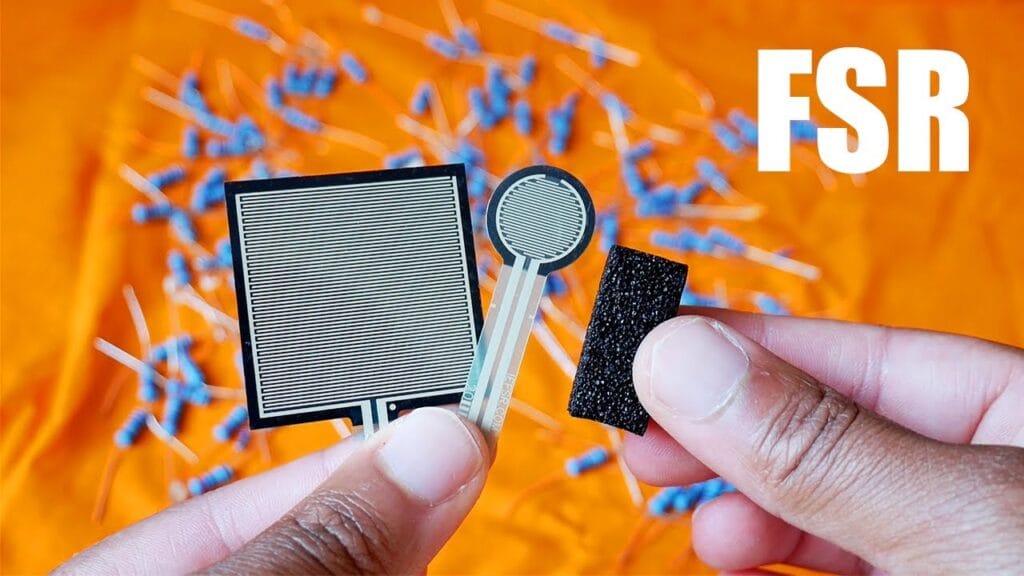
Force sensitive resistors come in many shapes and sizes. Common shapes are round, square, and rectangle. Some brands, like SOUSHINE, can make special shapes for you. The shape and size you pick change how you put the sensor in your project. They also change how the sensor feels force.
| Characteristic | Description | Impact on Performance |
|---|---|---|
| Shape | Round, square, rectangle, or custom | Changes how you mount it and where force is applied |
| Size | Sensor’s length, width, or diameter | Changes sensing area and how detailed it can measure |
| Material Composition | Conductive polymer or ink on a base | Changes sensitivity, how straight it measures, and how long it lasts |
Environmental Considerations
Temperature and Humidity
Think about where your sensor will be used. Hot or cold temperatures and wet air can change how the sensor works and how long it lasts.
Electronic parts do not like heat or wet air. These things can make them break faster and not work as well. When it gets hot and cold, parts can stretch and shrink. This can make them crack or break inside. Wet air can cause rust, leaks, and damage to the parts. Water can get inside the sensor and other parts. This can cause short circuits and make the parts not work right.
If your project will be in tough places, pick a sensor made for those conditions.
Durability Needs
Some projects need sensors that last a long time or can take rough use. For example, machines in factories or outdoor devices need sensors that do not break easily. The sensor’s material and how it is made change how strong it is. SOUSHINE makes sensors that last a long time. They are good for hard jobs.
When you know what you need, it is easier to pick the right force sensing technology. This helps your project work better and last longer.
Compare Force Sensing Resistors
When you look at force sensing resistors, check some key features. You want the sensor to fit your project. You can find details in datasheets. These papers tell you how each sensor works and what makes it special.
Force Range and Linearity
Force range means how much pressure the sensor can measure. Linearity tells you if the sensor gives steady feedback as force changes. You want a sensor that gives clear results when you press harder or softer.
Static Resistance
Static resistance is the value when you do not press the sensor. You should look for this number in the datasheet. It helps you know what to expect before you use the sensor.
Performance Metrics
You can compare sensors by looking at force range, response time, and working temperature. Here is a table that shows how SOUSHINE’s technology compares to other brands:
| Feature | SOUSHINE’s Technology | Competitors |
|---|---|---|
| Force Measurement Range | 10g up to 1000g | Varies |
| Response Time | Starts in less than 0.015ms | Varies |
| Operating Temperature Range | -40°C to +85°C | Varies |
SOUSHINE’s sensors work in many places. They react very fast and can measure many different forces. This makes them good for lots of uses.
Sensitivity and Response Time
Sensitivity means how well the sensor can notice small force changes. Response time is how fast the sensor reacts when you press it. You want a sensor that gives quick and correct feedback.
Speed of Measurement
Speed of measurement is important if you need fast results. SOUSHINE’s sensors start working in less than 0.015 milliseconds. This means you get feedback right away.
Repeatability
Repeatability means the sensor gives the same result every time you use the same force. You want high repeatability for good measurements. SOUSHINE has many force measurement choices at good prices. Interlink sensors are reliable but cost more. FlexiForce sensors cost more if you want special shapes. Tekscan sensors cost the most and are best for research or medical jobs. SOUSHINE lets you change the sensor to fit your project better than most brands.
- SOUSHINE gives you many force measurement options.
- Interlink sensors work well but are more expensive.
- FlexiForce sensors cost more for special shapes.
- Tekscan sensors cost the most and are best for research.
- SOUSHINE lets you customize sensors for your project.
Electrical and Mechanical Specs
You need to check the electrical and mechanical specs before you pick a sensor. These numbers help you know if the sensor will work for you.
Resistance Range
Resistance range shows how much the sensor’s resistance changes when you press it. You can find this in the datasheet. Make sure the range matches what you need.
Voltage/Current Limits
Voltage and current limits tell you how much power the sensor can take. Do not go over these numbers. If you do, the sensor might stop working or break. Always check these numbers before you use the sensor.
Tip: Always match the sensor’s specs to your project needs. This helps your device work well and stay safe.
When you compare force sensing resistors, you learn how each one works. You can pick the best sensor for your project. SOUSHINE’s sensors give fast response, a wide force range, and strong feedback. You can use them in many projects and get good results.
Evaluate FSR Brands and Quality
When you pick force sensing resistors, you want good value. Not every brand gives the same features or support. Some brands are more reliable than others. SOUSHINE is different from other brands in many ways. You should check a few things before you choose.
SOUSHINE Product Features
Customization Options
SOUSHINE lets you change many things about your sensors. You can pick the size and shape you need. You can also change the output signal and calibration. If you want your logo or special packaging, SOUSHINE can do that. You only need to order two pieces for these changes. You can also ask for graphic changes to match your design. This makes it easy to get sensors that fit your project.
- You can add your own logo (minimum order: 2)
- You can get special packaging (minimum order: 2)
- You can change the graphics (minimum order: 2)
SOUSHINE’s engineers help with overlays and circuit design. They work with you to make your ideas real.
Durability and Lifespan
You want sensors that last a long time. Some projects need millions of presses. SOUSHINE sensors can handle up to 1,000,000 presses. They stay accurate for a long time. They do not need much care or fixing. They keep working even if you use them a lot. This makes them a good choice for projects that need steady feedback.
Certifications and Support
Technical Assistance
You might need help when you use force sensing resistors. SOUSHINE gives strong technical support. Their engineers answer your questions and help fix problems. They give advice on overlays and circuit design. They help you get the best results from your sensor.
Industry Standards
You should check if the sensors meet important standards. Certifications show the brand follows strict rules. This means the sensors are good quality and reliable. Here is a table of important certifications for force sensing resistors:
| Certification/Standard | Description |
|---|---|
| ISO 9001 & AS9100 | Quality system standards for manufacturing |
| MIL-STD-790 | Reliability assurance standard |
| MIL-STD-690 | Procedures for failure rate |
| ISO 10012 | Calibration system standard |
| EIA-557 | Statistical process control standard |
| EIA-554 | Defect level (ppm) standard |
| EIA-481 | Tape & reel standard |
| MIL-STD-1686 | ESD (static control) standard |
| FED-STD-209 | Clean room requirements standard |
These certifications help you trust the sensors will work well.
Cost and Availability
Price Comparison
You want to save money and get good sensors. SOUSHINE sells low-cost force sensing resistors for many uses. Their prices are close to Interlink, which is also affordable. Tekscan and Flexiforce cost more but have extra features for special jobs.
Stock and Lead Times
You can buy SOUSHINE sensors in many online stores. They are easy to find in many countries. Some brands like Interlink and SparkFun are easier to find in local shops. Here is a table that shows how SOUSHINE compares to other brands:
| Brand | Online Stores | Local Distributors | Global Reach |
|---|---|---|---|
| SOUSHINE | Yes | Sometimes | Wide |
| Interlink | Yes | Yes | Wide |
| Tekscan | Yes | Yes | Wide |
| SparkFun | Yes | Yes | Wide |
| Adafruit | Yes | Sometimes | Wide |
| Flexiforce | Yes | Yes | Wide |
| Sensitronics | Yes | Sometimes | Wide |
Tip: Always check if the sensors are in stock before you buy. This helps you plan and avoid waiting.
When you look at brands, check for new technology and good support. Make sure the sensors have proven quality. SOUSHINE is special because of its custom options and strong team. You can trust their sensors to give steady feedback in your projects.
Test and Calibrate Your Force Sensor
Testing and calibrating your force sensor helps you get correct results. You need to do a few steps before using the sensor in your project.
Prototyping and Setup
Voltage Divider Circuit
First, you build a simple circuit to read the sensor. Most force sensors work best with a voltage divider. This setup helps you see resistance changes when you press the sensor. Here is what you do:
- Find your force sensor and learn how it changes resistance.
- Connect the sensor to your circuit. Use a pull-down resistor for better readings.
- Write code to read the sensor’s output and send data to your computer.
Tip: Use a breadboard so you can change things easily.
Integration Steps
After you build your circuit, put the sensor in your device. Make sure the sensor is flat and does not move. Secure the wires so they do not pull on the sensor. Test the sensor in its final spot to see if the readings change.
Calibration and Adjustment
Using Known Weights
Calibration helps you match the sensor’s output to real force. Follow these steps:
- Write down the sensor’s value when nothing presses on it. This is your starting point.
- Put known weights on the sensor. Write down the readings for each weight.
- Use these numbers to make a calibration curve. This curve helps you turn sensor readings into force values.
| Step | Purpose | Importance |
|---|---|---|
| Baseline Reading | Sets the zero point | Removes background noise |
| Known Weights | Matches readings to real forces | Builds a calibration curve |
| Data Smoothing | Reduces random changes in output | Gives steady, reliable feedback |
Signal Conditioning
You can use software to smooth out the sensor’s data. This step removes small jumps or noise in the readings. Some projects use a math equation to relate force to voltage. This method fixes drift and makes your measurements better.
Real-World Validation
Environmental Testing
Test your sensor in the same conditions as your project. Changes in temperature, humidity, or surface shape can change readings. Calibrate your sensor in these conditions for the best results.
| Key Considerations | Details |
|---|---|
| Calibration Conditions | Calibrate under real-use conditions for accuracy |
| Measurement Errors | Watch for errors from surface shape or loading style |
| Individual Calibration | Calibrate each sensor for best results |
| Calibration Equation | Pick the right equation for your pressure range and application method |
Long-Term Use
Test your sensor over time to see if it stays correct. Press and release the sensor many times. Check if the readings change after lots of uses. This step helps you know if your sensor will last in your project.
Note: Real-world testing and calibration help you get the most reliable feedback from your force sensor.
Troubleshooting and Optimization
When you use force sensitive resistors, you may face some common problems. Knowing how to spot and fix these issues helps your sensor work better and last longer.
Common FSR Issues
Inconsistent Readings
You might notice that your sensor gives different numbers even when you press with the same force. This can happen for several reasons. Signal drift, noise, or bad mounting often cause these problems. If you use more than 3 volts, the sensor may drift. Using special cables can block noise. Mounting the sensor so it can move a little helps reduce stress. Protecting the sensor from water and moisture also keeps readings steady. Adding filters to your circuit can smooth out shaky signals.
| Problem | Effective Fixes |
|---|---|
| Signal Drift | Use less than 3 V, around 2 V works well. Use special cables to block noise. |
| Temperature Sensitivity | Calibrate the sensor at the same temperature you plan to use it. |
| Noise | Add filters to reduce shaking. |
| Installation Issues | Mount the sensor so it can move a little. Protect it from water and moisture. |
Tip: Always check your wiring and recalibrate your sensor if you see strange numbers.
Mechanical Wear
Over time, pressing the sensor many times can cause wear. If you press at an angle or use too much force, the sensor may not last as long. Pressing straight down and avoiding side forces helps the sensor last longer. You should also check for dirt or dust, which can cause extra wear.
Performance Tips
Circuit Tweaks
You can make your sensor work better by changing your circuit. Try these ideas:
- Set a baseline reading before you start measuring.
- Test your sensor with known weights to check accuracy.
- Use software filters to smooth out the data.
- Pick the right resistor value for your voltage divider.
- Use a protective overlay to keep the sensor safe from damage.
- Check your wiring often and recalibrate if needed.
These steps help you get more reliable results in your applications.
Protective Measures
If you use your sensor in tough places, you need to protect it. Dust, moisture, and rough use can damage the sensor. Thin and flexible sensors fit well in small spaces, but you still need to keep them safe.
| Factor | Description |
|---|---|
| Durability | The sensor must handle repeated force and rough use. |
| Environment | The sensor should resist dust, moisture, and dirt. |
| Form Factor | The size and shape must fit the device. Thin and flexible sensors work well in small spaces. |
Note: Press straight down and avoid twisting or sliding motions. Use covers or enclosures to keep out dirt and water.
By following these tips, you can solve most problems and keep your force sensitive resistor working well for a long time.
Force Sensing Resistor Applications
Force sensing resistors help solve problems in many areas. SOUSHINE’s FSRs work in cars, hospitals, and smart devices. You can use them to make products safer and easier to use.
Automotive and Industrial
FSRs are important in cars and factories. They help with safety, control, and comfort.
Safety and Process Control
FSRs are used in car systems and machines. They help keep people safe and make machines work better.
| Application | Benefits |
|---|---|
| Dynamic limit sensors | Better safety and control |
| Motor speed control | Better performance and efficiency |
| Floor security panels | More security and reliability |
| Seat occupancy detection | More safety and comfort for passengers |
| Steering wheel control console | Better driver interaction and comfort |
| Mirror adjustor | More convenience and safety |
| Brake | Better vehicle safety and response |
- Touch controls in cars help you use your car easily.
- Seat detection helps keep passengers safe.
- Safety systems use FSRs to make driving safer and more comfortable.
SOUSHINE’s FSRs give quick and correct feedback. You can trust them in tough places like factories or cars.
Healthcare and Robotics
FSRs are used in hospitals and robots. They help watch patients and give robots a sense of touch.
Patient Monitoring
FSRs help track health signals. You can use them in wearable devices or medical tools.
- FSRs sense small forces, so you can watch pulse and breathing.
- Their flexible shape lets you use them in wearables for comfort.
- FSRs cost less than other sensors, so you can use them in more devices.
- They use little power, so devices last longer on batteries.
You can use SOUSHINE’s FSRs in smart beds and patient monitors. They help keep patients safe and comfortable.
Robotic Touch
Robots need to feel and react to touch. FSRs help robots grip and hold things safely.
- FSRs measure grip strength, so robots hold items without breaking them.
- They help steady robot arms by giving force feedback.
- FSRs record impacts, so you know if a robot handles fragile parts right.
You can use SOUSHINE’s FSRs to help robots control their movements and stay safe around people.
Consumer Electronics
FSRs make gadgets smarter and more fun. You find them in touch controls, wearables, and gaming devices.
Touch Controls
FSRs are in devices that respond to your touch.
- Wearable sensors use FSRs to sense taps and presses in games and trackers.
- Some FSRs, like embroidered ones, are strong and washable for clothes or sports gear.
- FSRs power touch controls in headphones, like AirPods Pro, so you can change modes with a squeeze.
- Sports gear uses FSRs to track grip and pressure, helping you play better.
SOUSHINE’s FSRs come in many shapes and sizes. You can use them in smartwatches, headphones, or smart clothes. They help make products that respond to every touch.
FSRs help you build safer cars, smarter robots, better medical devices, and more interactive electronics. SOUSHINE’s force sensing technology helps you bring your ideas to life in any field.
Picking the right force sensitive resistor means you must know what you need. You should think about how much force you want to measure. You also need to check the sensor’s size and where you will use it. The table below shows what is important:
| Attribute | Description |
|---|---|
| Resistance | Gets lower when you press harder |
| Sensing Range | Can sense soft touches and strong pushes |
| Construction | Very thin and bends to fit many devices |
| Cost | Good for testing and making lots of products |
SOUSHINE gives you strong sensors that work fast and can be changed for your project. You get help and choices for any kind of job. Try your sensor before you use it to make sure it works well and gives correct results. Look at more FSR choices and guides to help you make the best project.
FAQ
What is a force sensitive resistor (FSR)?
A force sensitive resistor, or FSR, is a sensor that changes its resistance when you press on it. You can use it to measure force or pressure in many devices.
How do I choose the right FSR for my project?
You should check the force range, size, shape, and environment where you plan to use the sensor. Always match the sensor’s specs to your project needs.
Can I use FSRs outdoors or in harsh environments?
Yes, you can use FSRs outdoors if you pick models designed for tough conditions. Look for sensors with strong materials and protective coatings.
How do I connect an FSR to my circuit?
You can use a voltage divider circuit. Connect one end of the FSR to power and the other to a resistor. Then, connect both to ground and read the voltage in between.
Do I need to calibrate my FSR?
Yes, you should calibrate your FSR. Use known weights to match sensor readings to real forces. Calibration helps you get accurate results.
How long do SOUSHINE FSRs last?
SOUSHINE FSRs can last up to 1,000,000 presses. They work well for long-term projects and need little maintenance.
Can I get custom shapes or sizes for my FSR?
Yes, SOUSHINE offers custom shapes and sizes. You can request special designs to fit your project. Minimum order is just two pieces.
What are common uses for FSRs?
You can find FSRs in cars, medical devices, robots, and smart gadgets. They help with touch controls, safety systems, and patient monitoring.