

Call us: +86-137-2353-4866
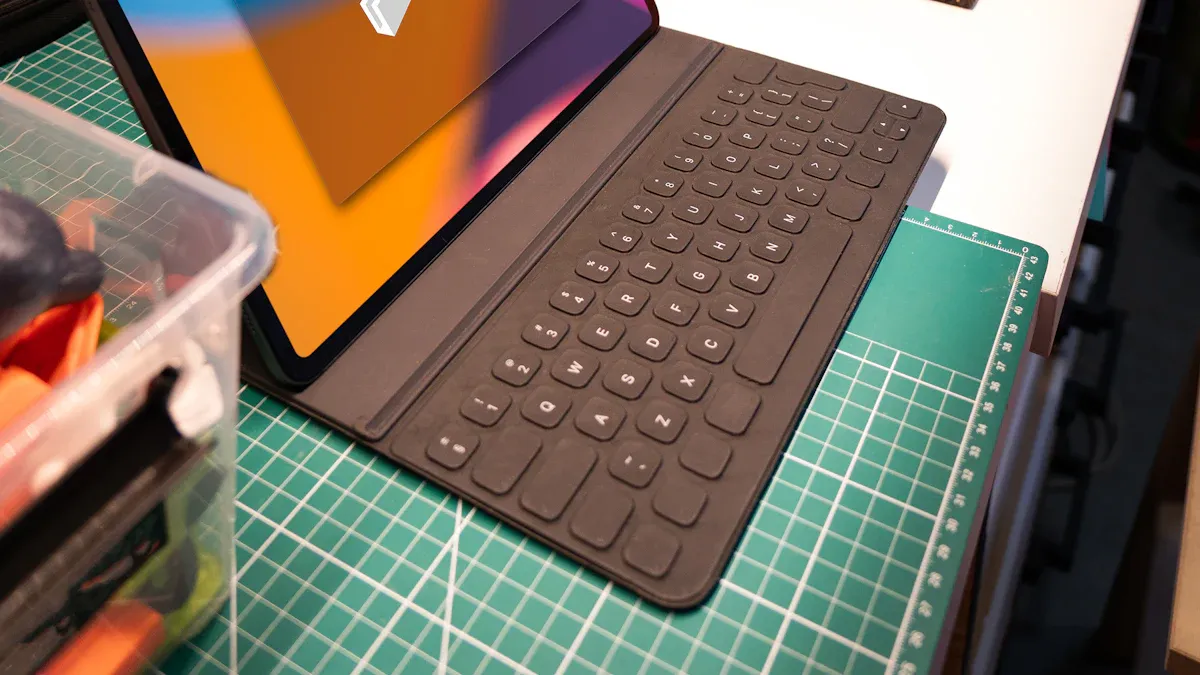

Get ready to learn about the 10 must-have capacitive touch products for 2025. New touch technology changes how you use devices at home, at work, and in other places. The worldwide market for these products will be worth over $32 billion next year. Capacitive screens are the most popular. You want products that are new, dependable, and easy to use. They should also be ready for the future. As you look at these choices, think about what is most important for you.
Table of Contents
Key Takeaways
Capacitive touch products will change how people use devices. They have new features like multi-touch and gesture sensing. Pick devices that are very strong so they last a long time. These devices can handle hard use and tough places. Find products that work fast when you touch them. They should still work if your hands are wet or if you wear gloves. Make sure the product works with your other devices. This helps you avoid problems when setting it up. It also makes your devices work better together. Choose products that have good support and a strong warranty. This gives you help if something goes wrong. Think about how you will use your touch screen. You might need it for home, work, or even in factories. Pick the one that fits your needs best. Keep learning about new trends in capacitive touch technology. This helps you buy the right products. Buy screens that do not scratch easily and are simple to clean. This keeps your screens looking nice for a long time.
Must-Have Criteria
Innovation in Capacitive Touch
You want new features in a capacitive touch product. In 2025, innovation is more than a nice screen. It means smarter sensors and better touch response. You get new ways to use your devices. Many products use projected capacitive technology now. This makes screens more sensitive and accurate. You can use more than one finger at once. This is called multi-touch. Multi-touch lets you zoom, swipe, and play games easily.
Manufacturers add features like gesture sensing and biometric scanning. These changes make devices safer and more fun. You will see better energy use and software working together. This helps devices last longer and work with more apps. Here is a quick look at some top innovations in touchscreen technology:
| Innovation Type | What It Means for You | Why It Matters in 2025 |
|---|---|---|
| Multi-Touch Capability | Use several fingers at once | Makes phones and tablets more useful |
| Durability | Scratch-resistant glass | Keeps your device looking new |
| New Hardware Tech | Faster, more responsive sensors | Better experience and more features |
Capacitive touch sensor makers keep trying to improve. They want to give you the best technology.
Reliability & Durability
You need devices that last a long time. That is why reliability and durability are important. Companies test products for tough conditions. Some touch screens work in hot or cold places. Some resist strong shaking. Others have ratings for dust and water safety.
Many touch screen makers follow strict rules and standards. These include ISO 9001 for quality, ISO 14001 for the environment, and ISO 45001 for safety. Some products meet car or factory certifications. This means you can trust them in cars, factories, or public places. Here are some key standards you might see:
| Certification | What It Proves |
|---|---|
| IP Rating | Protection from dust and water |
| ISO 9001 | High-quality production |
| ATEX | Safe in explosive environments |
| Industrial EMC | Works well around other electronics |
If you pick a product with these certifications, it will last. It will keep working even in tough places.
User Experience
You want your device to be easy to use. That is why user experience matters in capacitive touch sensors. A good touch screen responds fast and accurately. It should work with wet or gloved hands. Bright, clear screens help you see in sunlight.
Capacitive touch sensors now support smooth gestures and multi-touch. This makes games, apps, and controls more fun and simple. Many screens are easy to clean and resist scratches. This keeps them looking nice for years.
Tip: Always choose products that feel smooth and respond quickly. If you use your device every day, a good user experience helps a lot.
When you look for new devices, remember the best capacitive touch products have smart innovation, strong durability, and easy design. These features help you enjoy your technology now and later.
Compatibility & Integration
When you choose a capacitive touch product, you want it to work with your other devices. In 2025, it is very important for devices to connect well. You might use your touch screen with computers, tablets, smart home systems, or factory machines. If your devices cannot connect, it can be annoying. You want everything to work together like a team.
Capacitive touch products must fit into many different systems. Some use USB, I2C, or SPI to connect. Others use wireless ways like Bluetooth or Wi-Fi. You should check if your new touch panel uses the same connections as your main device. This makes setup simple and helps you avoid problems later.
Good capacitive touch integration means all parts work together. Touch controllers help the sensor talk to the main system. They process touch data and send it through different connections. The main system needs enough power to handle touch and run apps at the same time.
You might have some problems when using touch screens with many devices. Sometimes, the screen might think you touched it when you did not. This is called a “ghost touch.” It can happen from interference or when you use more than one finger. Cheaper models may only notice two or three fingers at once. Some screens need calibration to work well with many touches.
Here are some common problems you might see:
- Ghost touches can happen if the system gets confused by many fingers or signals.
- Some screens only notice a few fingers at once.
- Calibration helps the screen know where you touch.
You want a product that can handle these problems. Look for touch panels with smart controllers and good software. These features help stop ghost touches and make the screen more accurate. High-quality products, like those from SOUSHINE, use projected capacitive technology. This technology lets you use many fingers and works with lots of devices at once.
You should also think about the software. Some touch panels come with drivers for Windows, Android, or Linux. Others have custom APIs for special jobs. If you want to use your touch screen at work or in a factory, make sure it works with your current systems.
Here is a quick checklist to help you pick:
| What to Check | Why It Matters |
|---|---|
| Connection Type | Makes setup easy |
| Supported Operating Systems | Works with your main devices |
| Multi-Touch Support | Lets you use more fingers |
| Calibration Tools | Keeps touch accurate |
| Software Integration | Works with your apps and tasks |
If you want everything to work well, always check compatibility and integration before you buy. This way, your new capacitive touch product will fit in and make things easier for you.
Top Capacitive Touch Products 2025
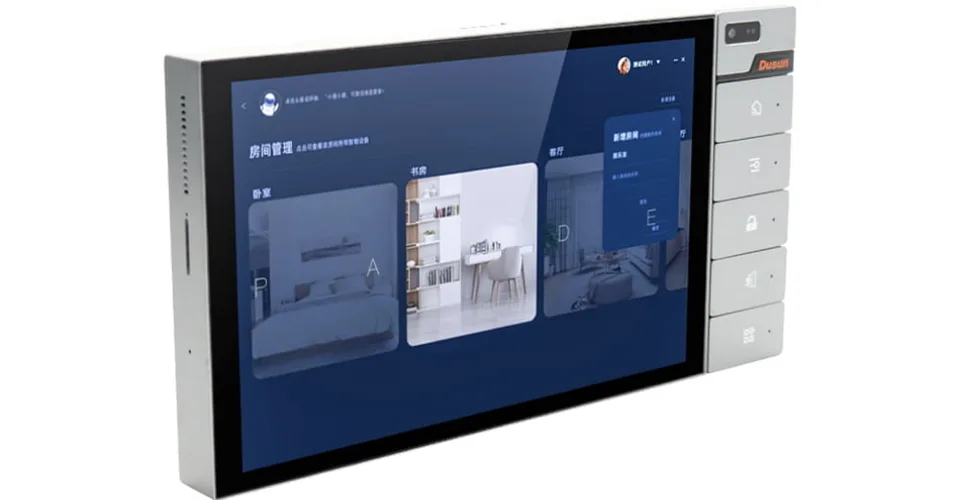
SOUSHINE Touch Panels
Features
You want a touch screen display that stands out in every way. SOUSHINE Touch Panels use advanced projected capacitive technology to give you a smooth and reliable experience. These panels work well in many places, like factories, hospitals, and public kiosks. You get a product that is ready to use and easy to install.
Here is what makes SOUSHINE Touch Panels special:
| Feature | Description |
|---|---|
| Exceptional Durability | Uses tempered glass and special coatings. Handles heavy use, cleaning, and impacts with ease. |
| Enhanced User Experience | High-transparency materials and sensitive controllers. Every touch feels quick and accurate. |
| Operational Reliability | Built for long life. You spend less time on repairs and save money over time. |
| Full Customization | Choose your size, thickness, coatings, and connections. Fits your exact needs. |
You also get a seamless look. The edge-to-edge glass design and custom borders make your device look modern and clean. SOUSHINE Touch Panels use high-quality capacitive touch screens that are easy to clean and hard to scratch. You can trust these panels in busy places.
2025 Advantages
In 2025, you need products that keep up with new demands. SOUSHINE Touch Panels lead the way with these advantages:
- Superior user experience with multi-touch support and no delay.
- Strong cover glass that resists scratches and is easy to clean.
- High IP ratings for dust and water, so you can use them almost anywhere.
- Custom panels with sensors and displays bonded together for better readability.
- Seamless integration with your systems, thanks to expert engineering.
If you want high-performance touch solutions, SOUSHINE gives you reliable, advanced touch sensors that work in many settings. These panels are a top choice for anyone who needs durable displays and high-quality touch screen products.
Apple Magic Trackpad 3
Features
You might want a touch screen solution that works well with your computer. The Apple Magic Trackpad 3 brings you a familiar design with a few upgrades. It now uses a USB-C port for charging and pairing. This matches the new standard for Apple devices and makes it easier if you already use USB-C.
- USB-C port for charging and pairing.
- Large glass surface for smooth gestures.
- Supports all the same gestures as before.
- Works with Mac and iPad.
2025 Advantages
The Magic Trackpad 3 keeps things simple and reliable. You get the same great tracking, click feel, and gesture recognition as the last model. The new USB-C port means you can use one cable for more devices. If you want a high-quality touch screen experience for your Mac, this trackpad is a solid pick. It fits right into your workspace and helps you control your computer with ease.
Samsung Galaxy Tab S9 Ultra
Features
If you want a tablet with a top-notch capacitive touch screen, the Samsung Galaxy Tab S9 Ultra is hard to beat. This tablet uses a 120 Hz refresh rate, which makes every touch feel fast and smooth. The S Pen works great for writing and drawing. You will notice that lines follow your pen with almost no delay.
- 14.6-inch AMOLED touch screen display.
- 120 Hz refresh rate for super-fast touch response.
- S Pen support for drawing and notes.
- Thin bezels for a modern look.
2025 Advantages
The Galaxy Tab S9 Ultra gives you a high-performance capacitive touch experience. The fast screen makes games, art, and apps feel more real. The S Pen lets you write and draw with precision. You get a large, bright display that is perfect for work or play. Just be careful with the thin bezels, as they can sometimes pick up accidental touches. If you want a tablet that leads in touchscreen technology, this one is a top choice.
Microsoft Surface Pro 10 Module
Features
You want a device that feels natural when you use it. The Microsoft Surface Pro 10 Module brings you a high-definition PixelSense touchscreen. This screen gives you sharp images and bright colors. You can touch, swipe, and write with a pen. The screen responds quickly to every move. You will notice almost no lag. The anti-reflective coating helps you see clearly, even in bright light. If you like to draw or take notes, the near-zero gap between the pen tip and the display makes writing feel real.
Here is a quick look at what you get:
| Feature | Description |
|---|---|
| Touch Accuracy | Pixel-level precision for both fingers and pen input. |
| Input Lag | Fast response for smooth scrolling and drawing. |
| Visual Fidelity | High resolution and color for sharp text and images. |
| Anti-Reflective Coating | Reduces glare for better visibility. |
| Natural Writing | Feels like writing on paper with almost no gap between pen and screen. |
2025 Advantages
You will find the Surface Pro 10 Module fits many needs. Creative workers, teachers, and business users all benefit from its capacitive touch sensor. You can scroll, draw, and use gestures with ease. The device supports multi-touch, so you can zoom and rotate images. You can also use the pen for detailed work. The Surface Pro 10 helps you work faster and smarter. It works well in offices, classrooms, and design studios.
If you use Copilot or other smart tools, the touch and inking features make your work even easier. You get a device that keeps up with your ideas and helps you stay productive.
SOUSHINE Industrial Touch Sensor
Features
You need a capacitive touch sensor that stands up to tough jobs. The SOUSHINE Industrial Touch Sensor gives you a custom fit for every project. It works in harsh places like factories, trucks, and public spaces. This sensor gives you real-time data, so you can act fast. It also detects weight and even senses if a child is present, adding extra safety.
Here is how it compares to other products:
| Feature | SOUSHINE Sensor | Typical Alternatives |
|---|---|---|
| Custom Fit | Yes | Limited |
| Real-Time Data | Yes | Sometimes |
| Weight Detection | Yes | Not always |
| Child Detection | Yes | Rare |
You can trust this sensor to last. It helps you lower repair costs, especially if you manage a fleet of vehicles or machines.
2025 Advantages
In 2025, you want products that do more than just sense touch. The SOUSHINE Industrial Touch Sensor gives you advanced features for safety and control. You get a sensor that fits your exact needs. It works in real time, so you can make quick decisions. The weight and child detection features help keep people safe. You also save money because the sensor is built to last. If you need a reliable solution for harsh environments, this product stands out among capacitive touch sensor manufacturers.
Lenovo Smart Display Gen 2
Features
You want a smart display that is easy to use. The Lenovo Smart Display Gen 2 uses a capacitive touch screen that feels smooth and quick. The interface is simple, so you can learn it fast. You can select features with just a light touch. The screen shows sharp images with great contrast. You do not need to press hard, which makes it comfortable for everyone.
Here are some key advantages:
| Advantage | Description |
|---|---|
| Easy to learn and use | Simple interface reduces mistakes and helps you find features quickly. |
| Incredible durability | Strong capacitive touchscreens last a long time, even with heavy use. |
| Sharper images with better contrast | The glass layer gives you clear, bright pictures. |
| More sensitive to light touch | You only need a gentle tap to use it. |
| Provide multi-touch sensing | You can use gestures like pinch and zoom for more control. |
2025 Advantages
The Lenovo Smart Display Gen 2 gives you a great user experience. You get a device that is strong and lasts for years. The capacitive touch sensor responds to every tap and swipe. You can use multi-touch gestures to zoom or scroll. The display looks sharp and bright, making it easy to see details. If you want a smart display that is simple and reliable, this product is a top pick for 2025.
Arduino Capacitive Touch Kit
Features
If you like building things, this kit is fun. The Arduino Capacitive Touch Kit helps you learn about capacitive touch. You can turn fruit, paper, or water into a touch sensor. The kit has easy modules and simple instructions. You connect sensors to your Arduino board. You can start making cool projects fast.
- Plug-and-play modules make setup quick.
- Works with lots of Arduino boards.
- Lets you make your own touch controls.
- Supports more than one touch at once.
- Good for learning about capacitive touch sensors.
You do not need to be an expert. The instructions show you each step. You can make games, smart home controls, or music tools. The kit helps you see how capacitive touch sensors work.
2025 Advantages
In 2025, you want products that help you learn new things. The Arduino Capacitive Touch Kit is flexible and easy to use. You can use it for school, hobbies, or testing ideas. The kit supports multi-touch, so you can make advanced controls. If you want to learn about capacitive touch sensors, this kit is a good start. You get hands-on practice with technology used by top manufacturers.
SOUSHINE Waterproof Touch Switch
Features
You need a touch switch for tough places. The SOUSHINE Waterproof Touch Switch works well in wet or dirty spots. It uses advanced capacitive touch sensor technology. It senses your touch even with gloves or wet hands. The switch meets high waterproof standards. You can trust it outside or in factories.
- Meets IP65 or better for waterproofing.
- Keeps dust and water out.
- Uses strong materials that resist scratches and chemicals.
- Works in hot, cold, and rough places.
- Easy to clean and take care of.
You can use this switch in hospitals, kitchens, or outside machines. It keeps working even when things get messy.
2025 Advantages
In 2025, you want products that last and keep you safe. The SOUSHINE Waterproof Touch Switch meets IEC 60529 standards. You get a switch that works in rain, dust, and with strong cleaners. Here is how it does in different places:
| Feature | Description |
|---|---|
| Environmental Resistance | Handles wet, rough, and chemical spots |
| Durability | Made for hard conditions |
| Applications | Good for factories, hospitals, and outdoors |
| Performance in Tough Places | Blocks water and dust, works in hot or cold, resists shaking and hits |
You can trust this capacitive touch sensor to keep working. If you need a switch for outside or tough jobs, this product gives you peace of mind. SOUSHINE is a leader among capacitive touch sensor makers with this strong solution.
Bosch Sensortec Touch IC
Features
You want smart tech in your devices. The Bosch Sensortec Touch IC brings advanced capacitive touch sensing. This small chip fits in phones, tablets, and smart home gadgets. It finds your touch fast and accurately. The chip supports multi-touch and gestures. You can swipe, tap, or pinch easily.
- Small size fits in many devices.
- Finds touch quickly and accurately.
- Supports multi-touch and gestures.
- Uses little power for longer battery life.
- Works with many operating systems.
You can use this chip in new products or upgrade old ones. It helps make your devices smarter and easier to use.
2025 Advantages
In 2025, you want capacitive touch sensors that work everywhere. The Bosch Sensortec Touch IC is flexible and powerful. You can add it to phones, tablets, or smart appliances. The chip uses little power, so batteries last longer. It supports the newest touch features. Your products feel modern and fast. If you want the best capacitive touch sensor technology, look for Bosch Sensortec in your devices.
LG Transparent OLED Display
Features
You want a display that grabs attention and feels futuristic. The LG Transparent OLED Display does just that. You can see both the screen and what is behind it at the same time. This makes it perfect for places where you want to show information without blocking the view.
Here are some features you will love:
- Transparency: You can look right through the screen. It feels like the images are floating in the air.
- High Picture Quality: Colors look bright and sharp. The display shows deep blacks and clear details.
- Flexible Design: You can use one panel or connect many together. The panels fit into different shapes and sizes.
- Touch Capability: Some models let you interact with the screen using your fingers.
- Slim and Light: The display is thin and easy to move or hang.
You can use these displays in many places. Stores use them to show ads on windows. Museums use them to add digital info to real objects. Offices use them for meeting rooms and creative spaces.
2025 Advantages
In 2025, you see LG Transparent OLED Displays everywhere. They change how you experience shopping, entertainment, and even work. You walk into a store and see a giant video wall made from sixteen 55-inch panels. The wall shows moving images, but you can still see the store behind it. This makes shopping feel exciting and new.
You also find these displays used as open partitions. Stores and offices use modular panels to divide spaces. At the same time, they show ads or helpful information. The panels do not block light or make the room feel small.
LG’s OLED technology lets you get creative. You can curve the panels, hang them from the ceiling, or use them as backlit glass. This makes every space look unique. Retailers love these displays because they help their stores stand out.
Here is a quick look at how people use LG Transparent OLED Displays in 2025:
| Application | How It’s Used |
|---|---|
| Massive Video Wall | A 380-inch transparent OLED wall in Tokyo creates an immersive shopping experience. |
| Modular Panels | Stores use 55-inch panels to build video walls or open partitions that show ads and info. |
| Creative Configurations | Curved displays, ceiling drops, and backlit glass make stores and offices look modern and fun. |
You get a display that is not just a screen. It becomes part of the space. You can show information, art, or ads without blocking what is behind the glass. If you want your business or space to feel modern and high-tech, the LG Transparent OLED Display is a smart choice for 2025.
Capacitive Touch Sensor Innovations
Multi-Touch Technology
Big changes are coming for multi-touch in 2025. You can use more fingers on your screen now. This helps you zoom, swipe, and play games easily. New capacitive touch sensor upgrades make devices feel faster. Gestures are smoother and you have better control.
Manufacturers keep finding new ways to improve screens. Here are some top upgrades:
| Advancement Type | Description |
|---|---|
| In-cell touch technology | Touch sensors are inside the display. This makes screens thinner and quicker. |
| Flexible touch displays | You can bend or curve screens. This lets phones and tablets have new shapes. |
| Ultra-thin sensors | Devices get slimmer but still work well and are accurate. |
You see these features in many new devices. SOUSHINE and other top brands use these upgrades. You can draw, write, and control your device easily.
Scratch-Resistant Screens
You want your screen to stay smooth and clear. In 2025, most capacitive touch screens use strong glass. This glass is tough and easy to clean. You do not need to worry about scratches from keys or coins.
Here is what new screens give you:
| Feature | Description |
|---|---|
| Durability | Strong glass keeps your screen clean and scratch-free. |
You can use your device every day and it still looks new. SOUSHINE screens are great for busy places like hospitals and factories. You know your capacitive touch sensor will last a long time.
Industry Applications
Capacitive touch sensors are used almost everywhere now. You see them in phones, cars, smart homes, and public places. Companies like SOUSHINE, Apple, and Samsung use multi-touch screens in new ways.
Look at how different industries use this technology:
| Application Area | Description | Adoption Rate by 2025 | Example Companies |
|---|---|---|---|
| Consumer Electronics | Touchscreens and wearables in phones, tablets, and watches. | Over 90% | Apple, Samsung |
| Automotive Controls | Touch panels for car controls and music systems. | Over 70% | Tesla |
| Smart Home Devices | Easy controls in smart thermostats and security panels. | Over 60% | Google Nest, Amazon |
| Industrial and Medical Equipment | Used in machines and medical tools for clean operation. | Over 50% | Medical suppliers |
| Public Kiosks | Interactive screens and ticket machines for everyone. | Over 80% | Transit stations, museums |
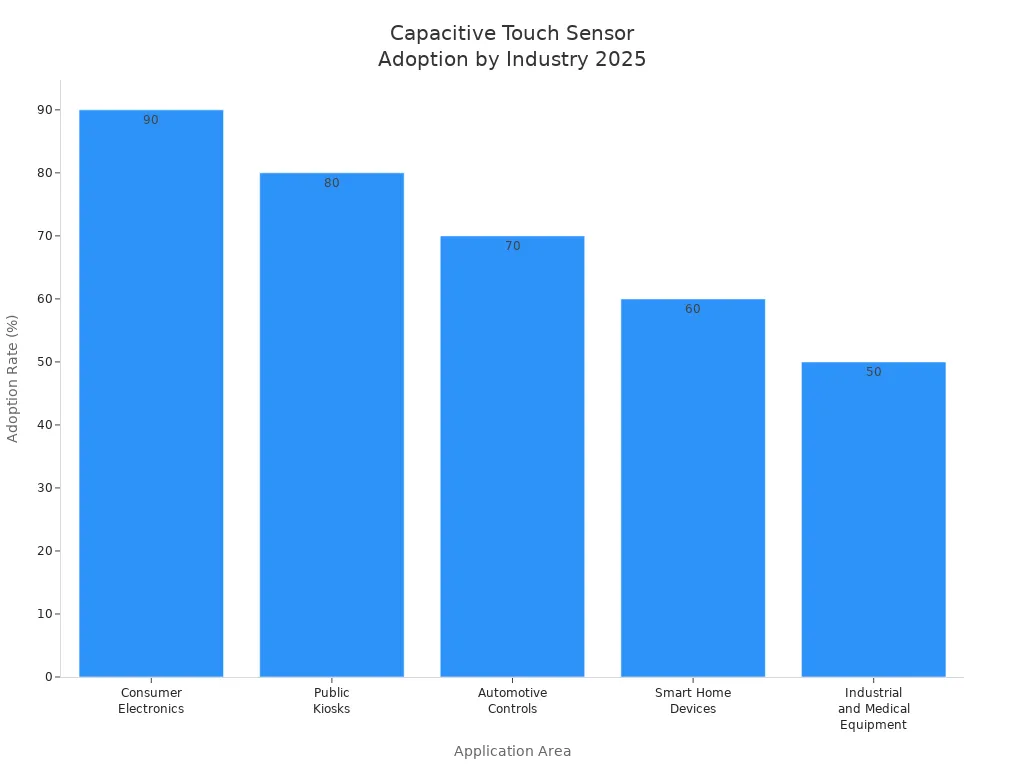
You find capacitive touch sensor products almost everywhere you go. Multi-touch screens help you control your car and use smart home gadgets. SOUSHINE keeps making better technology for all these places.
Touch Screen Display Comparison
Product Features Table
You want to know how the best touch screen displays compare. This table helps you see the main features side by side. It makes picking the right touch screen monitors much easier.
| Product | Screen Size | Touch Technology | Multi-Touch Support | Durability Features | Best For |
|---|---|---|---|---|---|
| SOUSHINE Touch Panels | Custom | Projected Capacitive | Yes | Scratch-resistant, IP rated | Industrial, Medical |
| Apple Magic Trackpad 3 | 6-inch | Capacitive | Yes | Glass surface | Mac, iPad |
| Samsung Galaxy Tab S9 Ultra | 14.6-inch | AMOLED Capacitive | Yes | Thin bezels, strong glass | Tablet, Drawing |
| Microsoft Surface Pro 10 Module | 13-inch | PixelSense Capacitive | Yes | Anti-reflective, sturdy | Office, Creative Work |
| SOUSHINE Industrial Sensor | Custom | Projected Capacitive | Yes | Rugged, real-time sensing | Vehicles, Factories |
| Lenovo Smart Display Gen 2 | 10-inch | Capacitive | Yes | Strong glass, easy clean | Smart Home, Office |
| Arduino Capacitive Touch Kit | Varies | Capacitive | Yes | DIY, flexible | Learning, Prototyping |
| SOUSHINE Waterproof Switch | Custom | Projected Capacitive | Yes | Waterproof, chemical proof | Outdoor, Kitchens |
| Bosch Sensortec Touch IC | N/A | Capacitive | Yes | Low power, compact | Embedded Devices |
| LG Transparent OLED Display | 55-inch | OLED Capacitive | Yes | Transparent, modular | Retail, Museums |
Tip: Look at this table to find the best touch screen display for you. You can match your needs with the right monitor for your space.
Performance Overview
You want a touch screen display that is fast and smooth. SOUSHINE Touch Panels work well in busy places. You can use them with gloves and keep them clean. These panels are good for factories or hospitals.
Apple Magic Trackpad 3 fits on your desk and works with Mac or iPad. You get easy gestures and a nice glass screen. Samsung Galaxy Tab S9 Ultra has a big screen for drawing and games. The display is bright and reacts quickly.
Microsoft Surface Pro 10 Module is great for work and art. The screen is sharp and works with a pen. SOUSHINE Industrial Sensor is made for trucks and machines. It gives you real-time data and is tough.
Lenovo Smart Display Gen 2 is perfect for smart homes. The screen is simple to use and easy to clean. Arduino Capacitive Touch Kit lets you build your own monitors. You can learn and try new ideas.
SOUSHINE Waterproof Switch is good for wet or outdoor places. The screen keeps out water and dust. Bosch Sensortec Touch IC fits in small devices. It saves power and works well.
LG Transparent OLED Display is special for stores and museums. You can see images and look through the screen. This display makes any space look cool and modern.
Note: Think about where you will use your touch screen monitor. Some are better for tough jobs. Others are best for art or learning. You can find a display that matches what you need.
Choosing the Right Capacitive Touch Product
Application Needs
You want a touch screen display that fits your life. Start by thinking about where you will use it. Do you need a screen for your home, office, or a busy public place? Some touch screen solutions work best in clean rooms or hospitals. Others handle rough spots like factories or outdoor kiosks.
Ask yourself these questions:
- Will many people use the screen each day?
- Do you need a big display or a small one?
- Should the screen work with gloves or wet hands?
- Is it for fun, work, or learning?
If you want a screen for a smart home, look for easy controls and a bright display. For schools or offices, pick a touch screen display that is simple to clean and strong enough for daily use. In factories, you need tough screens that resist dust and water. SOUSHINE offers touch screen solutions for all these needs. Their products work in many places and last a long time.
Tip: Write down your main needs before you shop. This helps you find the right touch screen display faster.
Technology Types
You will see many types of touchscreen technology. The most common is capacitive. This type uses your finger’s electric charge to sense touch. It feels smooth and reacts fast. You can use more than one finger at once. This is called multi-touch.
Some screens use resistive technology. These need pressure to work. They are good for places where people wear gloves all the time. But capacitive screens are better for most jobs. They give you a clear picture and quick response.
Here is a quick table to help you compare:
| Technology Type | How It Works | Best For |
|---|---|---|
| Capacitive | Senses electric touch | Phones, tablets, kiosks |
| Resistive | Needs pressure | Factories, gloves |
SOUSHINE uses advanced capacitive touch screen technology. You get a screen that looks great and works well in many places.
Compatibility Factors
You want your new touch screen display to work with your other devices. Check if it connects with your computer, tablet, or smart home system. Some touch screen solutions use USB, HDMI, or wireless links. Others need special drivers or apps.
Ask these questions:
- Does the screen work with Windows, Android, or Apple?
- Can you connect it to your network?
- Will it fit in your space or on your wall?
Good touch screen manufacturers, like SOUSHINE, make sure their screens fit many systems. Their touch screen solutions come with easy setup and strong support. You can use them with many devices and apps.
Note: Always check the specs before you buy. This saves you time and trouble later.
Durability & Support
When you pick a capacitive touch product, you want it to last. Durability means your screen or sensor can handle drops, scratches, and spills. Support means you get help when you need it. Both are important if you want your device to work well for a long time.
Why Durability Matters
You use your touch screen every day. Sometimes, accidents happen. Maybe you drop your device or spill water on it. A strong touch panel keeps working even after rough use. Look for these signs of durability:
- Scratch-resistant glass: Stops keys, coins, or pens from leaving marks.
- Water and dust protection: Keeps the inside safe from spills or dirt.
- Strong frame: Handles bumps and drops without breaking.
- Easy to clean: Lets you wipe away germs or smudges fast.
Tip: If you use your device in a busy place, like a factory or a hospital, pick a touch screen with a high IP rating. This means it blocks out water and dust.
Why Support Is Important
Even the best products need help sometimes. Good support means you can fix problems fast. You want a company that answers your questions and helps you set up your device. Here’s what to look for:
| Support Feature | Why It Helps You |
|---|---|
| Fast customer service | Gets you answers when you need them |
| Clear manuals | Makes setup and use simple |
| Warranty coverage | Protects you if something goes wrong |
| Software updates | Keeps your device working with new tech |
If you buy from a trusted brand, you get better support. SOUSHINE stands out here. Their team helps you with setup, troubleshooting, and even custom solutions. You get clear guides and fast answers. Their products come with strong warranties, so you feel safe with your choice.
How SOUSHINE Delivers
SOUSHINE builds touch panels with tough, chemically strengthened glass. Their products meet high standards for water and dust resistance. You can use them in kitchens, outdoors, or even in medical labs. If you need help, SOUSHINE’s support team is ready to guide you. They offer updates and advice, so your device stays up to date.
Note: When you choose a touch product, think about both how tough it is and how much help you can get. This way, you get a device that works well and lasts a long time.
If you want peace of mind, pick a product that is both durable and backed by strong support. SOUSHINE gives you both, making your choice easy.
Choosing the right capacitive touch products for 2025 helps you stay ahead in a fast-changing world. You want something that feels smooth, lasts long, and fits your needs. The best options bring new features and make life easier. Keep an eye on future trends and always pick what works for you. If you want a partner you can trust, SOUSHINE leads the way in capacitive technology.
FAQ
What is a capacitive touch screen?
A capacitive touch screen senses your finger’s electric charge. You touch the glass, and the screen reacts. You do not need to press hard. This makes it fast and easy to use.
Can I use a capacitive touch screen with gloves?
You can use some capacitive touch screens with gloves. Look for screens that support glove touch. SOUSHINE panels work well with gloves and even wet hands.
How do I clean my touch screen safely?
Use a soft, lint-free cloth. Lightly dampen it with water or screen cleaner. Wipe the screen gently. Do not spray liquid directly on the screen.
Are capacitive touch screens waterproof?
Many modern touch screens, like SOUSHINE’s, have high IP ratings. This means they resist water and dust. Always check the product’s IP rating before using it in wet places.
What does “multi-touch” mean?
Multi-touch lets you use more than one finger at the same time. You can pinch to zoom, swipe, or rotate images. This makes your device more fun and useful.
Do capacitive touch screens work in sunlight?
Some screens have anti-glare coatings or high brightness. These features help you see the display outside. SOUSHINE panels offer good visibility in bright light.
How long do capacitive touch screens last?
High-quality touch screens can last for years. They use strong glass and tough materials. If you take care of your screen, it will keep working well.
Can I connect a touch screen to any device?
Most touch screens work with many devices. Check if your device supports USB, HDMI, or other connections. SOUSHINE panels offer flexible options for easy setup.